AI-Ready Brand System: What It Is and Who Actually Needs One
What an AI-ready brand system is: design tokens, brand guidelines written for AI, image rules and a review checklist, and who actually needs one.

Summarize with AI
Key takeaways
- “AI-ready brand” means three different things online. This article is about one of them: making the AI tools inside your team produce on-brand work.
- The system has four parts: design tokens, a voice guide for AI, an image style guide, and a review checklist.
- It is not the same as a tool’s brand kit. A brand kit stores your logo, colors and fonts for one tool; the system also captures voice, image rules and review, and feeds every tool.
- Examples steer AI more reliably than adjectives. A good voice guide pairs each rule with an off-brand line and its on-brand rewrite.
- AI should make scenes, backgrounds and drafts. Your logo, product photos and core marks come from your own files.
- It needs an identity first, one owner, and occasional updates. It does not remove the need for review.
An AI-ready brand system is your brand guidelines rewritten for AI: files and rules that both your team and the AI tools they use can follow. It holds design tokens for color, type and spacing in a format developers and design tools import; a voice guide written as instructions for ChatGPT, Claude or similar assistants, with examples; an image style guide that says what AI may generate and what must come from your own files; and a checklist for reviewing AI-made work before it is published.
You need one if your team already makes content with AI every week and keeps fixing it to look and sound like you. You do not need one if you do not yet have a brand identity, or if one person writes and designs everything.
I’m Masuder Rahaman, a brand designer and the founder of Wolfpixel, where I lead the design team. The AI-ready brand system is one of my services, and it is also part of my Premium package. This article explains what it is, what goes in it, and, just as important, who should spend the money on something else first.
What does “AI-ready brand” mean?
The phrase is used for three different jobs, and this article is about the first: making the AI tools inside your team produce on-brand work.
- AI tools inside your team. Your marketers, designers and founders use ChatGPT, Claude, Gemini, Midjourney, Canva or Firefly to make posts, copy, images and decks. An AI-ready brand system gives those tools your rules, so the output looks and sounds like you. This article is about this meaning.
- AI systems outside your company. How ChatGPT, Gemini, Perplexity and AI search describe your brand when someone asks about you. That is a content, data and search problem, sometimes called generative engine optimization. It matters, but it is a different project.
- AI inside your product. How an assistant or agent built into your own product speaks and behaves. Your voice guide helps there, but the work is product design and engineering.
If you are reading because of the second or third meaning, the voice guide below is still useful, but the rest of the system is aimed at the first.
Why aren’t normal brand guidelines enough for AI tools?
Because they are written for people who apply judgment, and AI tools need exact values, examples and limits instead. Traditional brand guidelines are written for people: a PDF with the logo rules, the palette, the type hierarchy, some photography and a page on voice. A designer reads it once and applies judgment. AI tools do not work like that.
- Adjectives do not translate. “Friendly but professional” means something slightly different to every model and every prompt. Anthropic’s prompting guidance describes examples as one of the most reliable ways to steer Claude’s output; most voice pages have none.
- Values need to be exact. A PDF says “brand blue.” A tool needs the hex value, the type size in pixels, the spacing scale.
- Nobody tells the tool what not to do. Guidelines often show what is on-brand and rarely list the clichés, phrases and image styles to avoid, which is exactly what generative tools drift towards.
- Everyone keeps a private prompt. Each teammate pastes a slightly different version of the voice notes into their own chats, and nobody knows which is current.
An AI-ready system fixes those four gaps. It does not replace your brand guidelines; it translates them for a second audience. If your team is small, the one-page brand guidelines are a good base to translate from.
What’s in an AI-ready brand system?
Four parts: design tokens, a voice guide written for AI, an AI image style guide and a review checklist.
1. Design tokens for your brand
Design tokens are your brand’s visual decisions (colors, type sizes and weights, spacing, radii) stored as named values in a file developers and design tools can import, usually JSON. They are what lets a developer, a Figma library and an AI coding assistant all use the same “primary” color rather than three slightly different blues. The W3C Design Tokens Community Group published the first stable version of its format in October 2025, so tokens can now follow a shared format rather than one tool’s conventions.
A tiny, invented example of what a token file holds, one row per token:
| Token | Type | Value |
|---|---|---|
| color.brand.primary | color | #1E5A3C |
| color.brand.accent | color | #C8F25A |
| font.family.sans | fontFamily | Inter |
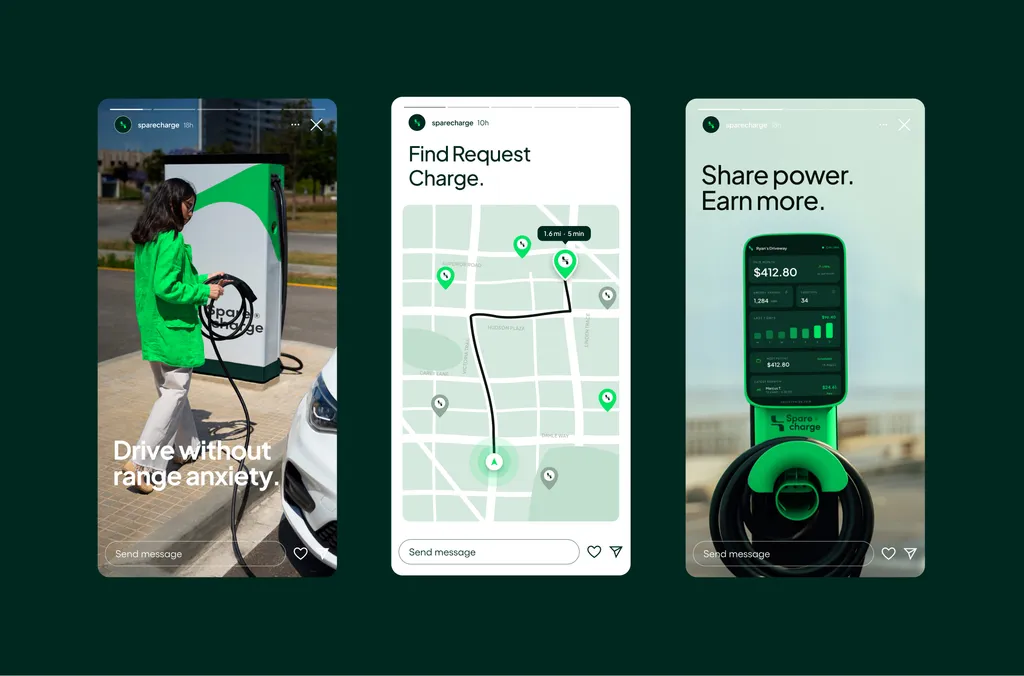
In the file itself each row is a small JSON entry with a $value and a $type. Developers can turn tokens into CSS variables or app styles; designers can import them as Figma variables; an AI assistant writing a landing page can be told to use only these values. On the SpareCharge project, the handover included a token-based design system so the product team could build the app, the smartwatch companion and the charger screen from the same decisions as the brand. The brand identity deliverables checklist shows where tokens sit in a full handover.
2. A voice guide written for AI
The voice guide is plain text you can add as project instructions or a custom assistant in ChatGPT, Claude, Gemini or similar tools. What makes it work is examples. Each rule comes with a line that breaks it and a rewrite that follows it. An illustrative rule:
- Rule: Say what the product does before saying why it matters.
- Off-brand: “Unlock the future of seamless financial empowerment.”
- On-brand: “Pay suppliers in 40 currencies from one account. Fees are shown before you send.”
A good AI voice guide also includes the words and phrases you never use, how the tone shifts by context (a support reply versus a launch post), and the claims you are not allowed to make. That last point is not only style: the FTC has said there is no AI exemption from the laws on the books, and a model will happily write “the most accurate on the market” unless told not to.
3. An AI image style guide
The image guide has three things: a prompt library that produces images in your style, reference images that show the style, and a clear line between what AI may make and what must come from your own files.
That line is the most important part. Use AI for scenes, backgrounds, textures, mood and illustration drafts. Do not ask an image generator to draw your logo, your product or your people; place your real logo file and real product photography on top, so they stay exact. Beyond accuracy, there is an ownership reason: in January 2025 the US Copyright Office concluded that AI-generated material is protected only where a human determined its expressive elements, and prompts alone are not enough. Your core marks should have a human author. The AI startup logo article covers this in more detail.
The guide also lists what is off-brand: lighting, color grading, composition and subject clichés the generator tends to default to, as negative prompts and as reference examples.
4. A review checklist
AI output still needs a person to check it. The checklist turns “does this feel on-brand?” into questions anyone on the team can answer in a minute:
- Are the colors and fonts the token values, not near-misses?
- Is the logo our file, unaltered, at the right clear space?
- Does the copy follow the voice rules, and does it avoid the banned phrases?
- Does it make any claim we cannot prove?
- Is any image of our product, people or logo generated rather than real?
- Does it need an AI disclosure? In the EU, the AI Act’s transparency rules have applied since August 2, 2026, including machine-readable marks on AI-generated content and labels on deepfakes.
Is an AI-ready brand system the same as a brand kit in Canva?
No: a brand kit stores your logo, colors and fonts for one tool, while the system also covers voice, image rules and review, and feeds every tool. Many tools now offer a brand kit. Canva’s Brand Kit stores your logos, colors and fonts, and Canva has brought Brand Kits into ChatGPT so designs made there can draw on it. Adobe, Figma and others have their own versions. Those are useful, and an AI-ready system should feed them. But a tool’s brand kit covers some of the job and leaves out the rest:
| Tool brand kit (for example, Canva) | AI-ready brand system | |
|---|---|---|
| Logos, colors, fonts | Yes, for that tool | Yes, as tokens and files for every tool |
| Voice rules with examples | Usually not | Yes |
| Image rules, prompts and references | Usually not | Yes |
| What AI must not make | No | Yes |
| Review checklist | No | Yes |
| Works across tools | Within that tool and its integrations | Portable: text, JSON and image files |
The practical answer is both: load the tokens and logo files into Canva’s Brand Kit, the voice guide into your AI assistant’s project instructions, the tokens into Figma and your code, and keep the system as the single source they all come from.
Who needs an AI-ready brand system?
Teams that already have a brand identity and make content with AI every week. You are a good fit if most of these are true:
- You already have a brand identity: a logo system, colors, type and some form of guidelines
- Your team makes content with AI tools every week, not occasionally
- More than one or two people do it, or contractors and agencies do it for you
- The output often looks generic or off-brand and someone keeps fixing it
- You have a product or website team who would use design tokens
- You publish enough that inconsistency is visible to customers
Three or more of these and the time your team spends fixing AI output is probably worth more than the system. Five or six and it is overdue.

Who does not need one yet
This section matters as much as the last one.
- You do not have a brand identity yet. The system translates an identity; it cannot invent one. Get the brand identity first; what a brand identity includes shows what that covers. If you are planning both, my Premium package includes the identity, the AI-ready system and website design together.
- Your guidelines are missing or badly out of date. Fix the guidelines for people first; the AI system is built on them. Brand guidelines on their own take one to two weeks.
- One person makes everything. A founder who writes every post and designs every slide can keep a voice note and a palette in their head and in one assistant’s instructions. Revisit when the second person starts.
- Your brand is about to change. If you are pre-product-market fit, mid-pivot or planning a rebrand, build the system after the change, not before.
- You make little content. If you publish a few times a month, a one-page voice note and your logo files may be enough.
How long does it take, and what do you need to provide?
About two to three weeks, starting from your current identity and the AI tools your team already uses.
Inputs from you: your current brand identity and guidelines, the AI tools your team uses, a sample of recent AI-made content (good and bad), and the person who will own the system.
The work: a review of your brand, your tools and where AI output goes off-brand; translating color, type and spacing into tokens and your voice into rules with examples; testing prompts and instructions in your actual tools and refining them until the output looks like you; and handing over the token files, the image style guide, the voice guide and the review checklist. It usually takes two to three weeks.
Ownership after handover: keep one dated master copy in a shared place, and have everyone load from it rather than keep private versions. Update it when the brand changes, when you adopt a new tool, or when the review checklist keeps catching the same problem. A quarterly look is usually enough.
What it will not do: make AI output perfect. Models drift, tools change, and prompts that work today may need adjusting after an update. The system narrows the gap and makes the review faster; it does not remove the review.
How much does an AI-ready brand system cost?
On its own it is quoted after a free call; inside the Premium package it is part of a fixed $6,999. The AI-ready brand system on its own is quoted after a free 30-minute call, because scope depends on how many tools, markets and languages it has to cover; you get a fixed written proposal and the price does not change mid-project. It is also included in the Premium package, which combines a brand identity, the AI-ready system (design tokens, an AI image style guide, brand voice for AI and a review checklist) and website design in Figma, at a fixed $6,999 over four to six weeks (compare the packages). AI tool subscriptions are not included.
How I build one
I start with your brand and the tools your team already uses, not with a template. The voice guide is tested in the assistants you use, the image prompts in the generators you use, and the tokens are delivered in a format your developers and Figma library can import. You get the files, the guides and the checklist, with full ownership, and three revision rounds on the way.
If you are not sure whether you need it yet, that is exactly what the free 30-minute call is for. Bring a few examples of AI-made content that did not look like you, and I will tell you whether a system would fix it or whether something else should come first.
FAQ
What is an AI-ready brand system?
Your brand guidelines turned into files and rules that people and AI tools can both follow: design tokens for color, type and spacing, a brand voice guide written as instructions for assistants such as ChatGPT, Claude or Gemini, an image style guide with prompts and reference images, and a checklist for reviewing AI-made work before it is published.
Is an AI-ready brand system the same as an AI brand kit?
Not quite. A tool’s brand kit, like Canva’s, stores your logos, colors and fonts for that tool. An AI-ready system also covers voice rules with examples, image rules, what AI must not make, and review, in portable files that feed every tool, including Canva.
Do I need a brand identity first?
Yes. The system translates an existing identity into rules for AI tools. If you do not have one yet, start with a brand identity; the AI-ready system can be added at the end, or both can come together in the Premium package.
Can AI design our logo with this system?
No, and it should not. Use AI for scenes, backgrounds and drafts; keep your logo, product photography and core marks human-made and placed from your own files. In the US, artwork generated entirely from prompts may not be protected by copyright.
What are design tokens for a brand, and what format are they in?
Design tokens are your brand’s colors, type sizes and spacing stored as named values, usually in JSON files that developers, Figma and AI coding assistants can import. They can follow the W3C Design Tokens Community Group format, first published as a stable version in October 2025.
How much does an AI-ready brand system cost?
On its own, it is quoted as a fixed written proposal after a free call, based on scope, and takes two to three weeks. It is included in the Premium package, which also covers a brand identity and website design in Figma, at $6,999 over four to six weeks.
Sources
- Design Tokens Community Group: Design Tokens Format Module 2025.10
- Anthropic: Claude prompting best practices (use examples)
- US Copyright Office: Copyright and Artificial Intelligence, Part 2: Copyrightability (January 2025)
- FTC: FTC announces crackdown on deceptive AI claims and schemes (September 2024)
- European Commission: AI Act transparency requirements from 2 August 2026