How to Brand a Shopify Store: Logo, Theme and Checkout
How to brand a Shopify store as one system: a logo family, color and type that hold up in the checkout, packaging that continues it, and the developer handoff.

Summarize with AI
Key takeaways
- The theme is shared; the brand is not. Two stores on the same theme are told apart by name, logo, color, type, photography and packaging.
- Design for Shopify’s limits. The checkout editor sets the logo, colors and a font from Shopify’s list, so your custom brand typeface may not be there. Choose a type system with a good match.
- Keep the system small: a logo family, one or two typefaces, a primary color with neutrals and an accent, and a photography standard.
- Packaging is the last touchpoint and often the most remembered. Plan what is printed, what is stickered, and what details the law requires.
- Give your theme developer files and rules, not a mood board: logo versions, color values, type choices with checkout fallbacks, photo specs and section rules.
Shopify store branding works when the logo, the theme, the checkout and the parcel are designed as one system, not chosen one at a time. To brand a Shopify store, design the brand first and then set up the theme to carry it. Thousands of stores run on the same few themes, so the theme cannot be what makes you recognizable; the brand has to be. That means a logo that reads at favicon and mobile-header size, a short color palette and a type system that still work in Shopify’s checkout (where the editor sets the logo, the colors and a font chosen from Shopify’s own list), a consistent photography style, and packaging that carries the same identity to the doorstep. The steps below go in that order, with a checklist and the files to hand your developer at the end.
I’m Masuder Rahaman, a brand designer and the founder of Wolfpixel, where I lead the design team. I design brand identities, logos and packaging for online stores and consumer brands. I do not build Shopify stores or set up themes; I design the brand and hand over the files your developer or theme needs. This article is about that part: what to design so a Shopify store looks like your brand rather than its theme.
Why does the brand matter more than the Shopify theme?
Because thousands of stores share the same theme, so the theme can’t tell customers which store they are in. Shopify makes it easy to launch a good-looking store in an afternoon, which is exactly the problem. Popular themes are used by thousands of stores, and a theme with its default fonts, its default color scheme and stock-looking product photos looks like every other store using it. Shoppers notice, even if they cannot say why.
A theme is a layout system: where the header goes, how products are listed, how the cart works. It is not a brand. The things that make a store recognizable sit on top of the theme:
- The name and logo, in the header, the browser tab, the checkout and the parcel.
- Color, applied with restraint and consistency.
- Typography, which carries more personality than most founders expect.
- Photography: backgrounds, light, framing and styling.
- Voice: product descriptions, buttons, emails and the note in the box.
- Packaging: what arrives at the door.
The e-commerce page on this site puts it in one line: two stores, one theme; the brand is the difference.
What can you brand in Shopify?
The storefront through your theme, and the checkout, accounts and emails through Shopify’s own settings, each with its own limits. Before designing anything, know where your brand will appear in Shopify and how much control you have in each place. Shopify’s own documentation is the source here; details change, so check the current Help Center before you build.
| Surface | Controlled by | What you can set |
|---|---|---|
| Storefront (home, collections, product pages, cart) | Your theme, via the theme editor and code | Logo, favicon, color schemes, typography, section layouts, imagery |
| Checkout, thank you and order status pages | Shopify’s checkout and accounts editor | Logo size and alignment, background colors, accent, button and error colors, and a font chosen from a list |
| Customer accounts and sign-in | The same editor | Since May 2026, the checkout branding settings carry across checkout, customer accounts and sign-in, with a reusable palette of up to 20 colors |
| Order and shipping emails | Shopify notification settings | Logo and accent color; template text |
| Marketplaces and social | Each platform | Logo, profile images, product photos |
Two consequences follow for the design.
The checkout font. In the checkout editor you choose the font from Shopify’s list. If your brand typeface is a custom or commercial font that is not on that list, the checkout will use something else at the moment a customer is deciding whether to pay. Shopify Plus stores can go further through the Checkout and Accounts Configuration API, but most stores work with the editor. Choose a brand type system that either is available in Shopify’s font library or has a close, approved match, and write that fallback into your guidelines.
The checkout colors. You set accent, button and error colors, and background colors. Since February 2026, a background image can sit only behind the order summary, not behind the header or the main content. A brand that depends on a gradient, a photographic background or a very light accent color will look weaker here. Make sure your primary or accent color works as a button with white or dark text at accessible contrast.
How to brand a Shopify store: the system to design
Five parts, in this order: the logo family, color, typography, photography and voice.
The logo family
A Shopify store uses your logo in more places and at more sizes than most founders plan for:
- The mobile header, small and often on a busy background. This is the most important size, because most store traffic is on phones.
- The desktop header, larger, usually horizontal.
- The favicon, in the browser tab at 16 to 32 pixels.
- The checkout header, with its own size settings.
- Social and marketplace avatars, square or circle crops.
- The parcel, the label and the product itself.
So the deliverable is a family: a primary logo, a horizontal lockup for headers, a symbol or monogram for the favicon and avatars, and one-color and reversed versions, as SVG for the web and PDF for print. If your logo is a long wordmark, the monogram matters most, because it is what customers see in the browser tab and their social feeds. A logo design project delivers this family in one to two weeks.
Some marketplace programs also have logo requirements. Amazon Brand Registry, for example, asks for a registered or pending trademark and a logo with the brand name permanently on the product or packaging, so the logo has to work small, on a label, a tag or a box. If you also sell on Etsy, Etsy shop branding covers its icon, banner and listing specs.
Color
Keep the palette short: one primary, one or two neutrals, and one accent. Decide which color is for buttons and calls to action, and test it at accessible contrast as a button with text on it. That decision has to hold in your theme’s color schemes and in the checkout’s accent and button settings. A palette of eight equally weighted colors will be applied inconsistently by every person who touches the store.
Typography
One or two typefaces: a display face for headings with personality, and a highly readable face for body text and product details. Check three things before committing:
- Is it available in Shopify’s font library, or can your developer load it in the theme with the right web license?
- What is the closest option in the checkout font list, and is it acceptable?
- Does it read well at mobile sizes in product descriptions, prices and buttons?
If you sell in Saudi Arabia or the UAE, the type system needs an Arabic typeface matched to the Latin one, and the logo needs an Arabic version designed alongside it, not typed later.
Photography
On a shared theme, product photography does more to set a store apart than almost anything else. Decide the standard and write it down: background (seamless color, texture or lifestyle), light (soft, hard, natural), framing and crop ratios that match the theme’s image slots, styling and props. A grid of product photos shot to one standard looks like a brand; a grid of supplier photos on mismatched white looks like a reseller.
Voice
Buttons, product descriptions, size guides, shipping messages, order confirmation emails and the note in the box are all brand. A short voice guide with examples keeps them consistent across whoever writes them.
An online store branding example: Vosho
Vosho is a furniture brand built on simplicity, functionality and high-quality craftsmanship. For Vosho we designed the wordmark, the print pieces and the online store design, in a five-week project that ran from research to branding to web design.
The identity is a wordmark with a looped V and a monogram, rust orange and cream, and two typefaces: CS Belia, a display face full of curls, for headlines, paired with Sen, a clean sans serif, for reading. The store design opens with a giant wordmark, then featured products, the full collection, categories and articles, with prices, color options and filters for wood, sofa, table and bed. The brief for the store was practical: work smoothly on any screen, so the design uses clear categories, a sticky navigation bar, search with autocomplete, light images and minimal animation.
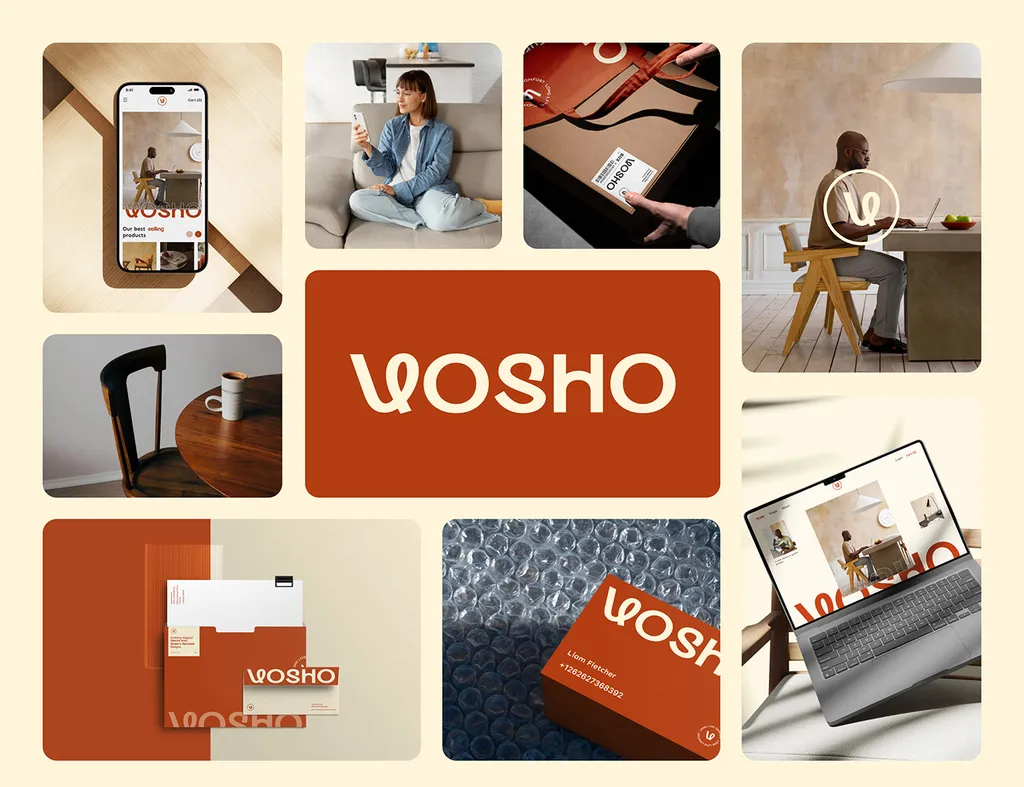
The same identity runs onto stationery, business cards, a tote bag, a magazine, a shopfront poster and a street hoarding. That is the point of a system: a customer who has only seen the website on a phone recognizes the tote bag and the hoarding.
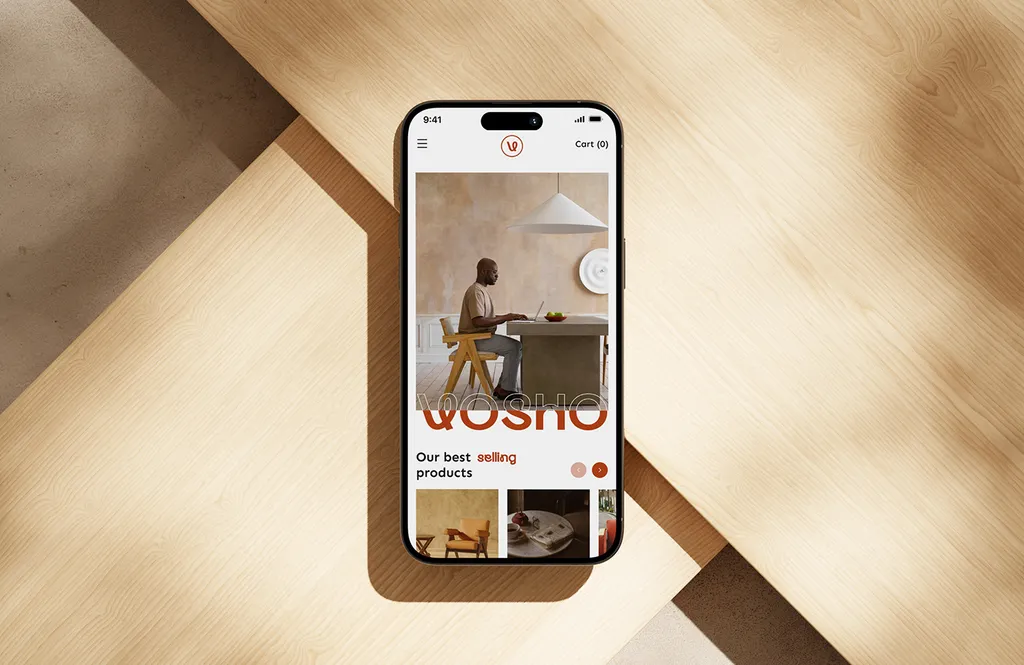
Designing a store and building it are separate jobs: I design, and a developer builds. That division is how I work on every e-commerce project. See the Vosho case study.
Do you need custom packaging for an online store?
Not on day one, but you do need packaging that looks like the same brand. For an online store, the parcel is often the only physical contact a customer has with the brand, and the moment they decide whether to buy again. Treat it as part of the same system, not an afterthought from the shipping supplier.
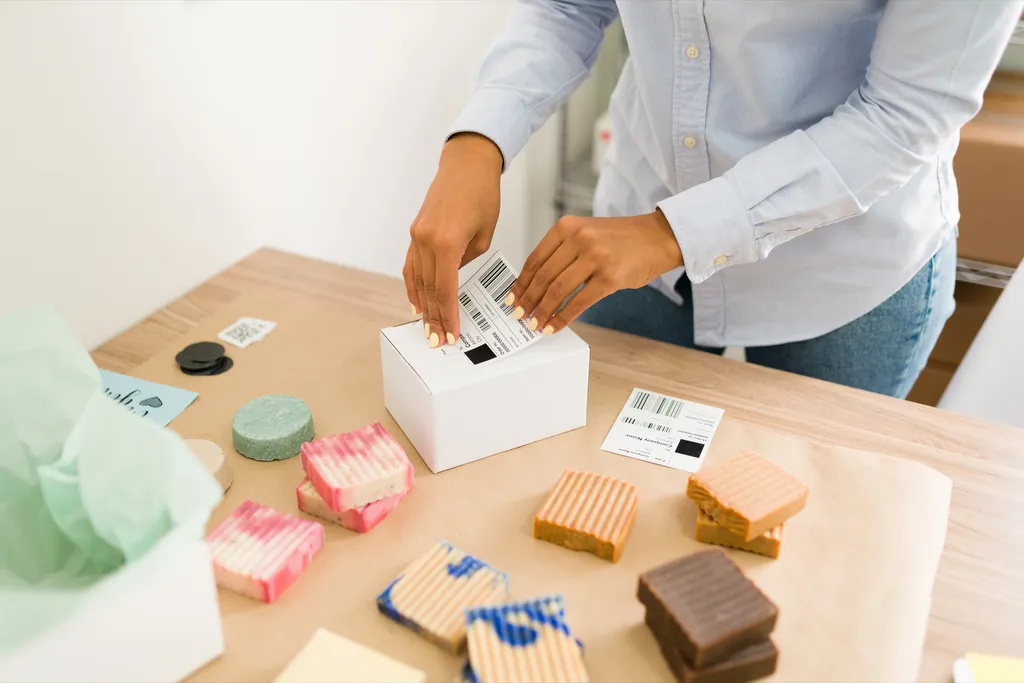
Decide what is printed and what is applied
Not every startup needs custom-printed boxes from day one. A sensible progression:
- Start: a plain mailer or shipper with a branded sticker or tape, a printed insert card, and branded tissue or a branded label on the product itself.
- Grow: a custom-printed mailer in your brand color, with the logo outside and a short message inside the lid.
- Scale: a full set of product packaging and shippers designed as a range, on your printer’s dieline.
The design system makes each stage look intentional. The sticker, the insert card and the printed box use the same logo, color and type, so the brand is consistent from the first order to the thousandth.
Two boxes, two jobs
The shipper protects the product in transit and carries the brand on the doorstep. The product packaging sits inside, carries the product’s own information and is what ends up on a shelf or in a photo. They have different requirements and often different printers. Design them together so they belong to the same family.
Leave room for the required details
Product packaging carries information the law requires, and the requirements depend on what you sell and where. In the US, packaged food regulated by the FDA must show the name of the food and the net quantity on the principal display panel, the part of the label shoppers see first. In Saudi Arabia, SASO’s technical regulation for textile products requires the label information in Arabic, with another language allowed alongside it. Ask your co-packer where any batch code or expiry date is printed on the line, and keep that area clear on the dieline. Approve colors on a printed proof on the real material, not on screen. The packaging design service covers labels, boxes and print-ready files on your printer’s dieline in two to four weeks, and perfume brand identity shows how far a stock component can go with the right label and box.
What files does your Shopify developer need?
A logo family, color values, type with a checkout fallback, photo specs and section rules. The single most useful thing a brand designer can give a Shopify developer is a set of files and rules that remove guesswork. A good handoff includes:
- Logo family in SVG and PNG: primary, horizontal header lockup, monogram for favicon, one-color and reversed
- Favicon file at the sizes the theme requests
- Color values (HEX), with which color is primary, background, text, button and accent, mapped to the theme’s color scheme slots
- Typefaces, with web license confirmation, sizes for headings, body, prices and buttons, and the approved checkout font fallback
- Photography standard: background, light, framing and the crop ratios for product, collection and banner slots
- Section rules: which homepage sections are used, in what order, and what goes in each
- Button and link styles
- Checkout settings: logo size and alignment, background, accent and button colors, font
- Order and shipping email logo and accent color
- Brand guidelines and a Figma library with the source files
With that, the developer configures the theme to express the brand rather than the other way round. For the full list of files a brand identity should hand over, see the brand identity deliverables checklist.
Shopify store branding mistakes to avoid
- Choosing the theme first. The theme’s defaults become the brand by accident.
- A custom typeface with no checkout fallback. The brand disappears at the payment page.
- A long wordmark and no monogram. The favicon and social avatar become unreadable smudges.
- Too many colors. Every banner, button and badge in a different shade.
- Supplier photos on mismatched white. The fastest way to look like a reseller.
- Packaging from the shipping supplier’s catalog. A generic brown box after a carefully branded website.
- A brand built only for the website. It falls apart on Instagram, Amazon, the parcel and the label. Digital branding covers how one system holds across every screen.
Shopify store branding checklist before launch
- Logo family designed and tested at mobile-header, favicon, checkout and avatar sizes
- Short palette with a defined button color at accessible contrast
- Type system available in Shopify or licensed for the web, with a checkout fallback
- Arabic and English versions of the name, logo and type, if you sell in the Gulf
- Photography standard written and applied to every product
- Short voice guide with examples for product copy, buttons and emails
- Theme chosen and configured to the brand, not the reverse
- Checkout, customer accounts and notification emails branded
- Packaging plan: what is printed, what is applied, and required details placed
- Guidelines and source files handed to the developer and anyone making content
How much does Shopify store branding cost?
With me, a logo for a new store is $999 and a full brand identity is $3,499; packaging is quoted by scope. I design the brand your Shopify store, your marketplace listings and your parcels carry. A logo takes one to two weeks. A full brand identity with strategy, color and type, imagery, voice, guidelines and a Figma library is $3,499 over two to three weeks. Packaging design for boxes and labels takes two to four weeks and is quoted after a call. The Premium package ($6,999, four to six weeks) adds an AI-ready brand system and website design in Figma for your developer to build. I do not set up Shopify themes or build stores, and the theme setup is not part of any package; the files and guidelines are ready for whoever does it. All packages are on the pricing page, and brand identity cost compares market ranges. More of my furniture and home work is under home and garden.
The e-commerce page covers selling on Shopify, Salla, Zid and the marketplaces, including the rules for Saudi Arabia and the US. If you are launching or relaunching a store, book a free 30-minute call and bring the theme you are considering, a few product photos and your current packaging, if you have any.
FAQ
How do I brand a Shopify store?
Design the brand system first (logo family, color, type, photography, voice and packaging), then choose and configure the theme to express it. Test the logo at mobile and favicon size, choose type that works in Shopify’s checkout, and apply the same identity to the parcel.
What can I customize in Shopify’s checkout?
In the checkout and accounts editor you can set the logo’s size and alignment, background colors, accent, button and error colors, and a font chosen from Shopify’s list. Since February 2026, a background image can sit only behind the order summary. Shopify Plus stores can go further with the Checkout and Accounts Configuration API. Check Shopify’s Help Center for the current options.
Can I use my own font in Shopify?
In the storefront, usually yes, if your developer loads it in the theme and you hold a web license. In the checkout editor you choose from Shopify’s font list, so plan a close fallback for your brand typeface.
How much does Shopify store branding cost?
With me, a logo for a new store is $999 (one to two weeks) and a full brand identity with guidelines is $3,499 (two to three weeks). Packaging is quoted by scope. I design the brand and hand over the files; your developer builds and configures the store.
What logo files does a Shopify store need?
A primary logo, a horizontal lockup for the header, a monogram or symbol for the favicon and social avatars, and one-color and reversed versions, as SVG and PNG for the web and PDF for print.
Do I need custom packaging for an online store?
Not on day one. Start with a branded sticker or tape, an insert card and a branded product label, then move to a custom-printed mailer as you grow. Design all of it from the same identity so it looks intentional at every stage.
Sources
- Shopify Help Center: Customizing the style of your checkout
- Shopify Changelog: Unified branding customization across checkout and customer accounts (May 13, 2026)
- Amazon: Amazon Brand Registry
- FDA: Guidance for Industry: A Food Labeling Guide
- Adherent (formerly Compliance & Risks): The Technical Regulations for Textiles in Saudi Arabia (March 2024)